EmojiBako
ホットキーで呼び出し、日本語で検索できるmacOSの絵文字ピッカー
A macOS emoji picker you open with a hotkey and search in Japanese or English
ダウンロード(無料)Download (free)macOS 14.4以降・Apple Silicon搭載のMac
macOS 14.4 or later · Mac with Apple silicon
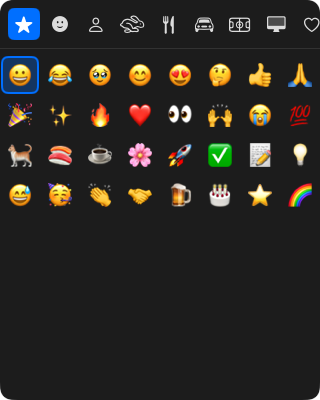
特長
- どこからでも呼び出せる初期設定では⌘.でピッカーが開きます。ホットキーは設定で変更できます。
- 日本語で検索できる「ねこ」「ネコ」「猫」「cat」のどれでも🐈が見つかります。変換中のひらがなでも絞り込めます。
- よく使う絵文字が先頭に使用回数の多い絵文字から並びます。iCloudで同期すると、同じAppleアカウントのMac同士でそろいます。使用回数はファイルに書き出して、あとで戻すこともできます。
- クリップボードを元に戻す入力に使ったクリップボードは、画像やファイルなどの形式も含めて元に戻します。
使い方
| 操作 | キー |
|---|---|
| ピッカーを開く・閉じる | ⌘.(設定で変更可) |
| 絵文字を選ぶ | 矢印キー |
| 選んだ絵文字を入力する | Enter |
| カテゴリを切り替える | Tab・Shift + Tab |
| 検索を始める・終える | ⌘F |
| 閉じる | Esc |
権限と通信
アクセシビリティの許可が必要です。選んだ絵文字を作業中のアプリに入力するために、⌘Vのキー操作を送るためです。初回起動時に案内が表示されます。
外部と通信するのは、GitHubで新しいバージョンを確認するとき(1日1回、設定でオフにできます)と、使用回数の同期をオンにした場合のiCloudとの通信だけです。同期をオンにすると、使用回数とMacのコンピュータ名をあなた自身のiCloudに保存します(開発者には送られません。初期設定はオフです)。解析やクラッシュレポートの送信は行いません。ソースコードはGitHubで公開しています。
Features
- Open it from anywherePress ⌘. by default. You can change the hotkey in Settings.
- Search in Japanese or English「ねこ」, 「ネコ」, 「猫」, and "cat" all find 🐈, even while you are still composing Japanese text.
- Frequently used emoji firstThe emoji you use most appear first, and iCloud sync keeps them the same across your Macs.
- Your clipboard is restoredYour clipboard, including images and files, comes back after the emoji is typed.
Usage
| Action | Key |
|---|---|
| Open or close the picker | ⌘. (configurable) |
| Move the selection | Arrow keys |
| Type the selected emoji | Enter |
| Switch category | Tab / Shift + Tab |
| Start or end search | ⌘F |
| Close | Esc |
Permissions and network access
EmojiBako needs Accessibility access to send ⌘V, which types the emoji you pick into the app you are working in. You are guided through this on first launch.
EmojiBako connects only to GitHub to check for new versions (once a day, can be turned off in Settings) and, if you turn on usage sync, to iCloud. With sync on, usage counts and your Mac’s computer name are stored in your own iCloud; they are not sent to the developer, and sync is off by default. EmojiBako does not send analytics or crash reports. The source code is on GitHub.